Lost File

Memory Forensics & Cryptographic Analysis

Challenge 2 Memory Forensics Reverse Engineering Cryptography

Challenge Scenario

Description: My friend told me to run this executable, but it turns out he just wanted to encrypt my precious file. And to make things worse, I don't even remember what password I used. 😥 Good thing I have this memory capture taken at a very convenient moment, right?

Artifacts Provided: We're given a disk image containing an executable and encrypted file, plus a memory dump captured during the encryption process.

Initial Investigation

Discovering the Files

Examining the desktop, we find two critical files:
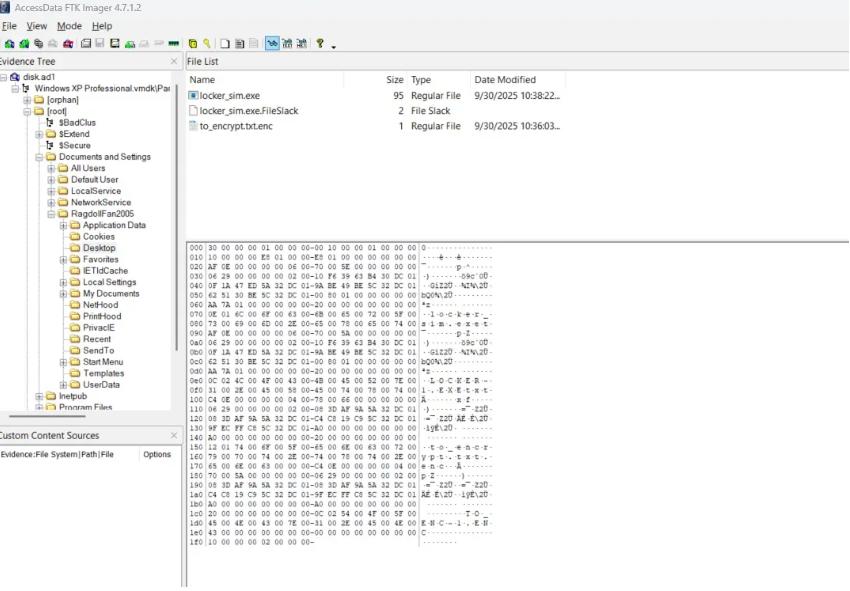
Desktop files
Files Found:
locker_sim.exe - The encryption executable
to_encrypt.txt.enc - The encrypted file

The executable is written in C, so we can use IDA Pro to analyze its functionality and understand the encryption mechanism.

Reverse Engineering the Executable

Using IDA Pro, we decompile the executable and analyze the main function. Here's the complete decompiled code:

int __cdecl main(int argc, const char **argv, const char **envp) { size_t v4; // ebx size_t v5; // eax char FileName[260]; // [esp+14h] [ebp-694h] BYREF size_t ElementCount; // [esp+118h] [ebp-590h] BYREF void *v8; // [esp+11Ch] [ebp-58Ch] BYREF size_t v9; // [esp+120h] [ebp-588h] BYREF void *Src; // [esp+124h] [ebp-584h] BYREF char v11[260]; // [esp+128h] [ebp-580h] BYREF BYTE v12[4]; // [esp+22Ch] [ebp-47Ch] BYREF int v13; // [esp+230h] [ebp-478h] int v14; // [esp+234h] [ebp-474h] int v15; // [esp+238h] [ebp-470h] BYTE v16[4]; // [esp+23Ch] [ebp-46Ch] BYREF int v17; // [esp+240h] [ebp-468h] int v18; // [esp+244h] [ebp-464h] int v19; // [esp+248h] [ebp-460h] int v20; // [esp+25Ch] [ebp-44Ch] BYREF void *Block; // [esp+260h] [ebp-448h] BYREF char Buffer[260]; // [esp+264h] [ebp-444h] BYREF CHAR Filename[260]; // [esp+368h] [ebp-340h] BYREF char Str[260]; // [esp+46Ch] [ebp-23Ch] BYREF char Destination[256]; // [esp+570h] [ebp-138h] BYREF FILE *Stream; // [esp+670h] [ebp-38h] BYTE *pbData; // [esp+674h] [ebp-34h] size_t Size; // [esp+678h] [ebp-30h] size_t v29; // [esp+67Ch] [ebp-2Ch] DWORD ModuleFileNameA; // [esp+680h] [ebp-28h] char *v31; // [esp+684h] [ebp-24h] size_t Count; // [esp+688h] [ebp-20h] CHAR *i; // [esp+68Ch] [ebp-1Ch] int *p_argc; // [esp+69Ch] [ebp-Ch] p_argc = &argc; __main(); if ( argc <= 1 ) return 1; v31 = (char *)argv[1]; memset(Destination, 0, sizeof(Destination)); if ( read_computername_from_registry((LPBYTE)Destination, 256) ) { strncpy(Destination, "UNKNOWN_HOST", 0xFFu); Destination[255] = 0; } fflush(&__iob[1]); memset(Str, 0, sizeof(Str)); memset(Filename, 0, sizeof(Filename)); ModuleFileNameA = GetModuleFileNameA(0, Filename, 0x104u); if ( !ModuleFileNameA || ModuleFileNameA > 0x103 ) goto LABEL_18; for ( i = &Filename[ModuleFileNameA - 1]; i >= Filename && *i != 92 && *i != 47; --i ) ; if ( i >= Filename ) { Count = i - Filename; if ( i == Filename ) { strncpy(Str, Filename, 0x103u); Str[259] = 0; } else { if ( Count > 0x103 ) Count = 259; strncpy(Str, Filename, Count); Str[Count] = 0; } } else { LABEL_18: strcpy(Str, "."); } v29 = strlen(Str); if ( v29 && (Str[v29 - 1] == 92 || Str[v29 - 1] == 47) ) snprintf(Buffer, 0x104u, "%ssecret_part.txt", Str); else snprintf(Buffer, 0x104u, "%s\\secret_part.txt", Str); Block = 0; v20 = 0; read_file_to_buffer(Buffer, (int)&Block, (int)&v20); DeleteFileA(Buffer); v4 = strlen(v31); Size = v4 + strlen(Destination) + v20 + 10; pbData = (BYTE *)malloc(Size); if ( v20 ) snprintf((char *const)pbData, Size, "%s|%s|%s", v31, Destination, (const char *)Block); else snprintf((char *const)pbData, Size, "%s|%s|", v31, Destination); v5 = strlen((const char *)pbData); if ( sha256_buf(pbData, v5, v16) ) { puts("SHA256 failed"); return 1; } else { *(_DWORD *)v12 = *(_DWORD *)v16; v13 = v17; v14 = v18; v15 = v19; if ( Str[strlen(Str) - 1] == 92 || Str[strlen(Str) - 1] == 47 ) snprintf(v11, 0x104u, "%sto_encrypt.txt", Str); else snprintf(v11, 0x104u, "%s\\to_encrypt.txt", Str); Src = 0; v9 = 0; if ( read_file_to_buffer(v11, (int)&Src, (int)&v9) ) { printf("Target file not found: %s\n", v11); return 1; } else { v8 = 0; ElementCount = 0; if ( aes256_encrypt_simple((int)v16, v12, Src, v9, (int)&v8, (int)&ElementCount) ) { puts("Encryption failed"); return 1; } else { if ( Str[strlen(Str) - 1] == 92 || Str[strlen(Str) - 1] == 47 ) snprintf(FileName, 0x104u, "%sto_encrypt.txt.enc", Str); else snprintf(FileName, 0x104u, "%s\\to_encrypt.txt.enc", Str); Stream = fopen(FileName, "wb"); if ( Stream ) { fwrite(v8, 1u, ElementCount, Stream); fclose(Stream); if ( Block ) free(Block); if ( Src ) free(Src); if ( v8 ) free(v8); free(pbData); return 0; } else { return 1; } } } } }

Step-by-step Analysis of the Encryption Process

The executable performs the following operations:

1. Takes a command-line argument argv[1] (the password)

2. Reads the computer name from registry or defaults to UNKNOWN_HOST

3. Reads a file called secret_part.txt (then deletes it afterward!)

4. Combines these into one string:
<argv[1]>|<COMPUTERNAME>|<secret_part_contents>
or if no secret part: <argv[1]>|<COMPUTERNAME>|

5. Computes SHA256:
sha256_buf(pbData, v5, v16)
So v16 = SHA256 hash of the combined string

6. Creates the AES-256 key:
Copies the first 32 bytes (256 bits) of the SHA256 hash into v12, v13, v14, v15

7. Encrypts the file to_encrypt.txt using:
aes256_encrypt_simple((int)v16, v12, Src, v9, (int)&v8, (int)&ElementCount)
and writes the result as to_encrypt.txt.enc
⚠️ To decrypt, we need three components:
  1. argv[1] - The command-line argument (password)
  2. COMPUTERNAME - The hostname
  3. Content of secret_part.txt (the deleted file)

Memory Forensics with Volatility

Finding the Command-Line Argument (Password)

Using Volatility's consoles plugin, we can extract the command history to find how the executable was run:
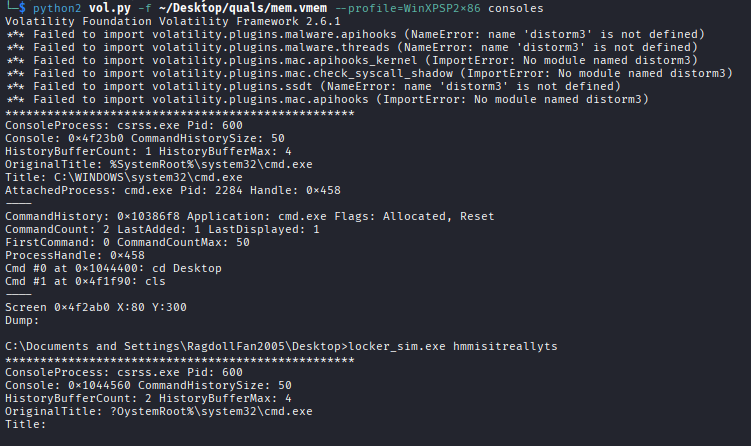
python2 volatility/vol.py -f mem.vmem --profile=WinXPSP2x86 consoles
Output: C:\Documents and Settings\RagdollFan2005\Desktop>locker_sim.exe hmmisitreallyts
Volatility consoles output
Password Found (argv[1]): hmmisitreallyts

Finding the Computer Name (Hostname)

Using the envars plugin to extract environment variables and locate the computer name:
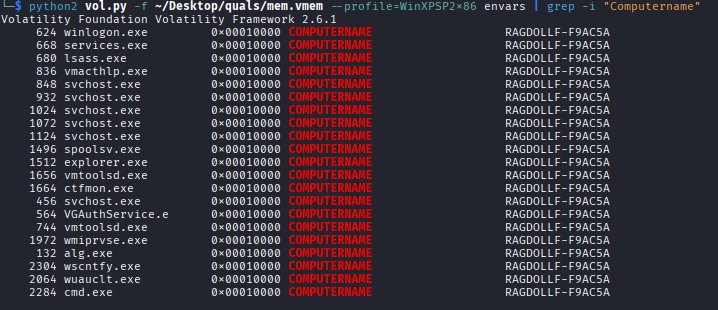
python2 volatility/vol.py -f mem.vmem --profile=WinXPSP2x86 envars
Environment variables output
Hostname Found: RAGDOLLF-F9AC5A

Recovering the Deleted File

The last piece is the content of secret_part.txt which was deleted. Since it was deleted, we can check the Recycle Bin:

Secret Part Content(found in /home/kali/Desktop/quals/RECYCLER/S-1-5-21-682003330-706699826-1417001333-1003/Dc1.txt): sigmadroid

Perfect! We now have all three components needed for decryption.

Decryption & Flag Extraction

Writing the Decryption Script

Now that we have all the components, we can write a Python script to decrypt the file:

import hashlib from Crypto.Cipher import AES from Crypto.Util.Padding import unpad def derive_key(arg, computername, secret_part): data = f"{arg}|{computername}|{secret_part}" sha = hashlib.sha256(data.encode()).digest() return sha def decrypt_file(enc_path, out_path, arg, computername="UNKNOWN_HOST", secret_part=""): key = derive_key(arg, computername, secret_part) iv = key[:16] cipher = AES.new(key, AES.MODE_CBC, iv) with open(enc_path, "rb") as f: ciphertext = f.read() plaintext = unpad(cipher.decrypt(ciphertext), AES.block_size) with open(out_path, "wb") as f: f.write(plaintext) print(f"[+] Decrypted -> {out_path}") decrypt_file( "to_encrypt.txt.enc", "to_encrypt_decrypted.txt", arg="hmmisitreallyts", computername="RAGDOLLF-F9AC5A", secret_part="sigmadroid" )
✅ Decryption Successful!

Extracting the Flag

After running the decryption script, we get the output:

Vm14U1MxWXlSblJWYkd4VVltdEtjRmxzV2xwa01XdzJWR3BDYkdKSGREWlZNakUwV1ZaYU5sVnViRnBOYWtaWVdXMHhSMWRXVW5GUmJYQnBZbGhTTlZkWGVHdFpWVEZIVVdwYVVGWkhjems9

This appears to be Base64 encoded. Let's decode it:

🎉 FLAG: Securinets{screen+registry+mft??}

Challenge solved! The flag references the forensics techniques used: screen capture (memory dump), registry analysis, and MFT (Master File Table) for file recovery.

Investigation Summary

3

Key Components

2

Artifacts Analyzed

AES-256

Encryption Type

SHA256

Hash Function

Tools & Techniques

Reverse Engineering

  • IDA Pro
  • Static Analysis

Memory Forensics

  • Volatility Framework
  • consoles plugin
  • envars plugin

Disk Forensics

  • Recycle Bin Analysis
  • File Recovery

Cryptography

  • Python PyCryptodome
  • AES Decryption
  • Base64 Decoding

Explore More Challenges

Check out other forensics writeups from Securinets CTF 2025.